What Does a Flashing Red Light Usually Mean?
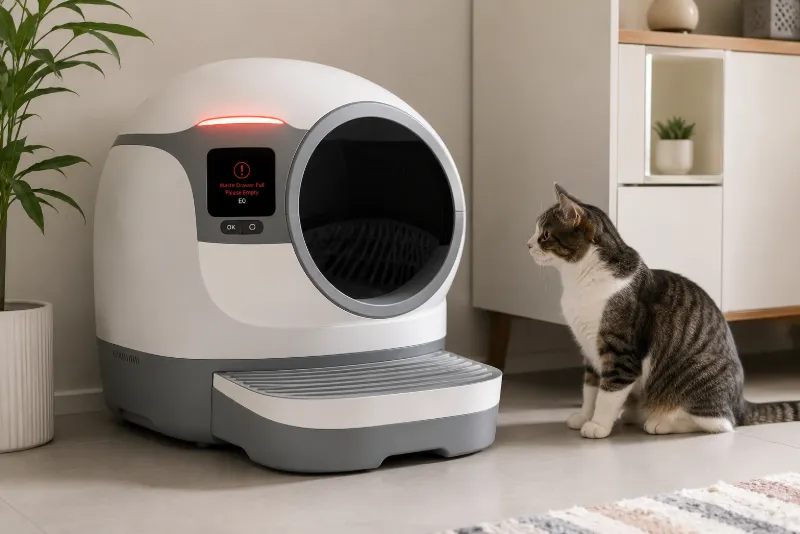
Most modern self-cleaning litter boxes include multiple safety systems that monitor movement, weight, and motor operation. When one of these systems detects an unexpected condition, the unit may pause its cleaning cycle and display a flashing red light.
The exact meaning varies by manufacturer and model, but a flashing red light commonly indicates one of the following:
Safety sensor obstruction
Pinch detection activated
Weight sensor requires recalibration
Bonnet or dome is not fully installed
Motor encountered resistance
Cleaning cycle interrupted
Before assuming the unit is broken, it is worth checking these common causes first.
Step 1: Inspect the Pinch Terminals and Safety Sensors
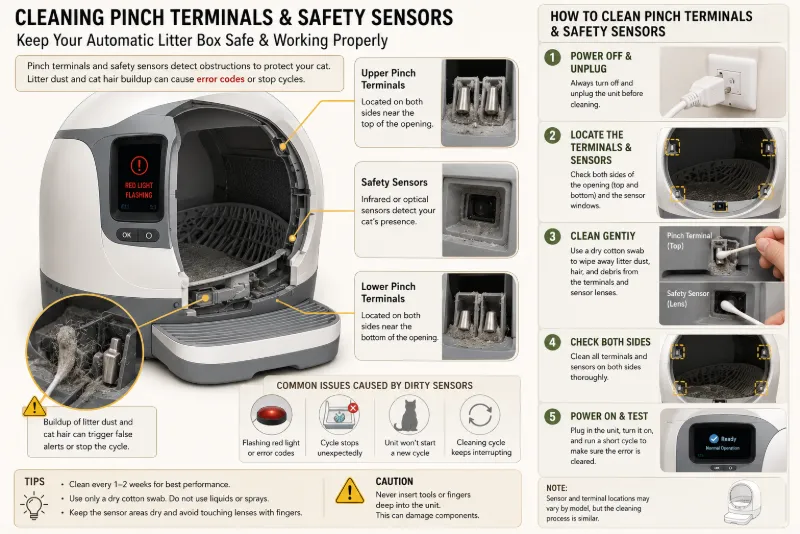
One of the most frequent reasons for a flashing red light is debris interfering with the safety system.
Pinch sensors are designed to stop the machine if they detect resistance, helping prevent injury to curious cats.
Small amounts of the following can interfere with proper sensor operation:
Cat litter dust
Clumped litter
Cat hair
Dirt or debris
How to Clean the Sensors
Turn off and unplug the litter box.
Locate the pinch terminals or safety contacts.
Use a dry cotton swab or soft cloth to remove litter dust and hair.
Avoid using excessive water or harsh cleaning chemicals.
Reconnect power and test the unit.
Regular cleaning of these areas can prevent many false error warnings.
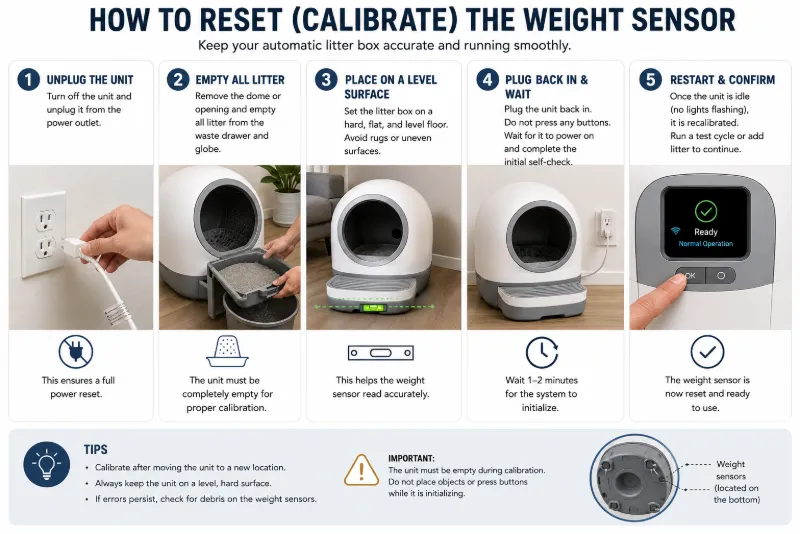
Step 2: Reset the Weight Sensor
Many automatic litter boxes use a built-in scale to detect when a cat enters or leaves the unit. If the sensor loses calibration, the machine may incorrectly believe a cat is still inside and refuse to begin the cleaning cycle.
Basic Recalibration Procedure
Turn off and unplug the unit.
Remove your cat from the area.
Empty the waste drawer if necessary.
Ensure the litter amount matches the manufacturer's recommendation.
Place the unit on a firm, level floor.
Reconnect power and allow the system to complete its startup sequence.
Some models include a dedicated calibration or reset procedure. Always refer to the user manual for model-specific instructions.
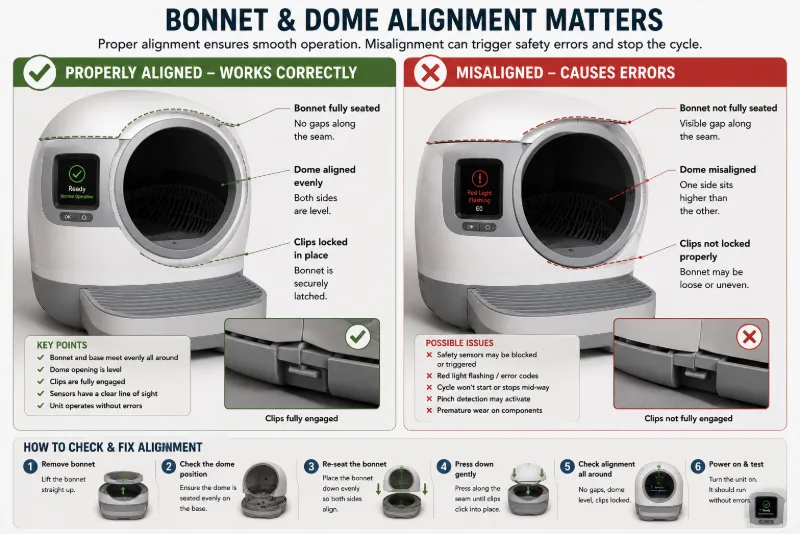
Step 3: Check the Bonnet and Dome Alignment
Many rotating self-cleaning litter boxes include removable covers or rotating domes that must be installed correctly before operation.
If these components are slightly misaligned, safety switches may prevent the cleaning cycle from starting.
Inspect for:
Loose locking tabs
Misaligned bonnet
Dome not fully seated
Foreign objects trapped between panels
Remove the cover if necessary and reinstall it carefully until all locking points engage properly.
Step 4: Check for Motor Obstructions
If the drum begins to rotate before stopping and displaying a flashing red light, the motor may be encountering resistance.
Possible causes include:
Overfilled litter
Large clumps blocking movement
Objects inside the rotating chamber
Excessive litter buildup along the track
Clean the rotating components and avoid exceeding the recommended litter fill level.
Step 5: Inspect Power and Electrical Connections
Although less common, unstable power can sometimes interrupt normal startup.
Check:
Power adapter connection
Wall outlet
Power cable damage
Loose connectors
If available, try another compatible outlet before assuming an internal electrical fault.
Common Causes and Quick Fixes
| Problem | Likely Cause | Suggested Solution |
|---|---|---|
| Red light flashing immediately | Sensor obstruction | Clean pinch terminals |
| Stops during cleaning cycle | Weight sensor or obstruction | Reset and inspect drum |
| Will not start | Bonnet misalignment | Reinstall cover correctly |
| Repeated error after reset | Sensor contamination | Clean sensors thoroughly |
| Motor stalls repeatedly | Mechanical resistance | Remove excess litter or debris |
Preventive Maintenance Tips
Routine maintenance reduces the likelihood of sensor-related errors.
Wipe sensors weekly.
Remove litter dust from moving parts.
Use the recommended litter type and fill level.
Keep the unit on a stable, level surface.
Inspect rotating parts during routine cleaning.
Following the manufacturer's maintenance recommendations can improve long-term reliability.
When Should You Consider Replacement?
If your litter box continues displaying the same error after repeated cleaning, sensor inspection, and resetting, there may be an internal hardware fault such as a failed sensor, worn motor, damaged control board, or defective wiring.
If the unit is still covered by the manufacturer's warranty, contacting customer support is usually the best first step before attempting major repairs.
If the warranty has expired and repair costs approach the price of a new unit, replacement may be the more practical option.
Reliable Self-Cleaning Litter Boxes Worth Considering
When purchasing a new automatic litter box, reliability and sensor performance are often more important than the number of smart features.
Models that consistently receive positive long-term feedback from reviewers and owners include:
Litter-Robot 4 — Known for advanced safety sensors, quiet operation, and automatic weight detection.
PetSafe ScoopFree SmartSpin — Features enclosed cleaning, app connectivity, and simplified maintenance.
Neakasa M1 — An open-top design with multiple safety sensors and automatic cleaning cycles.
Before purchasing, compare warranty coverage, replacement part availability, litter compatibility, cleaning capacity, and customer support in your region.
Helping Your Cat Adjust After Repairs
Once the litter box is working again, allow your cat to reintroduce itself gradually. Some cats are startled by unfamiliar sounds or movement after maintenance.
Leave the unit powered on without initiating a cleaning cycle for a short period if your model allows it, reward calm behavior with treats, and avoid forcing your cat into the box. Most cats resume normal use once they realize the unit is functioning safely.
FAQs
Why is my automatic litter box flashing a red light?
A flashing red light usually indicates that a safety system has detected an issue such as a blocked sensor, incorrect weight sensor reading, misaligned housing, or an obstruction during the cleaning cycle. The exact meaning depends on the model.
How do I reset the weight sensor?
For many models, unplug the unit, ensure it is empty and placed on a level surface, reconnect the power, and allow it to complete its startup process. Some manufacturers provide additional calibration steps in the user manual.
Can cat litter dust cause error codes?
Yes. Fine litter dust and cat hair can accumulate on safety sensors or electrical contacts, causing false obstruction warnings.
Should I repair or replace my automatic litter box?
If basic troubleshooting does not resolve the issue and the unit is under warranty, contact the manufacturer. For older units with repeated hardware failures, replacing the litter box may be more cost-effective than extensive repairs.
Which self-cleaning litter boxes are considered reliable?
Several models have developed strong reputations for reliability, including the Litter-Robot 4, PetSafe ScoopFree SmartSpin, and Neakasa M1. The best choice depends on your budget, the number of cats, available space, and desired features.