Understanding GPS Signal Drift
Unlike traditional wired containment systems, GPS dog collars determine their position by receiving signals from satellites orbiting the Earth. The collar continuously calculates its location based on these satellite signals.
GPS is highly useful, but no consumer GPS system provides perfect accuracy at every moment. Small positioning errors—often called GPS signal drift—may occur because satellite signals are affected by the environment and changing reception conditions.
Most modern GPS collars compensate for these small errors through software filtering, motion sensors, and mapping algorithms. However, temporary drift can still affect virtual boundaries and live tracking.
Why Signal Drift Can Be a Problem
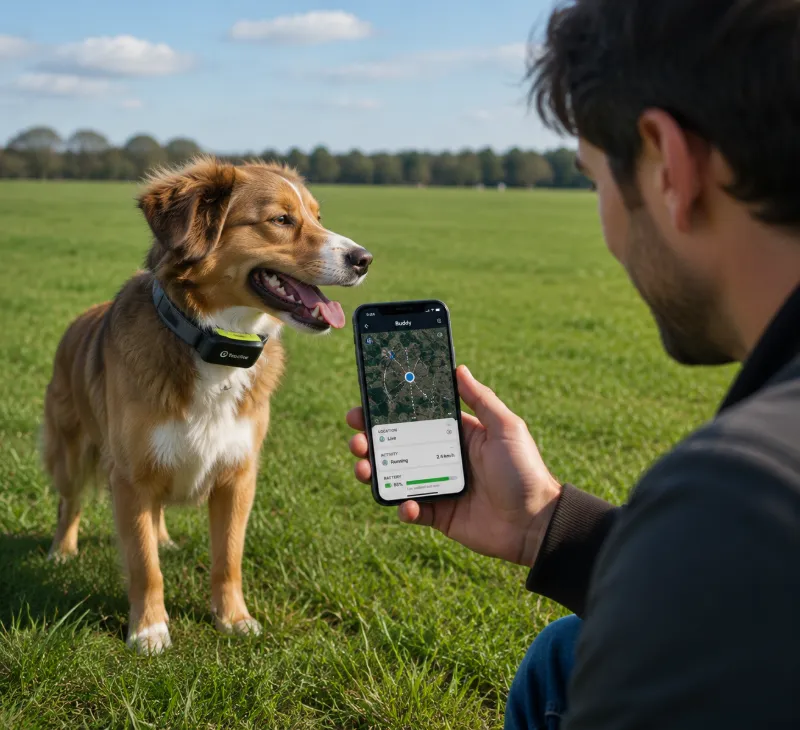
A GPS position that shifts unexpectedly may cause the collar or mobile app to believe the dog is somewhere it is not.
| Problem | Possible Result |
|---|---|
| Boundary drift | False containment warnings or delayed alerts |
| Tracking delay | Owner sees an outdated location |
| Poor GPS accuracy | Virtual fence appears to move slightly |
| Temporary signal loss | Tracking pauses until reception returns |
| Compass error | Incorrect heading or movement direction |
These issues can be especially frustrating in open properties where owners rely on virtual fences rather than physical barriers.
Common Reasons a GPS Dog Collar Loses Signal
Dense tree canopy
Steep valleys or cliffs
Tall buildings
Metal roofs or steel structures
Poor satellite visibility
Outdated firmware
App synchronization issues
Low battery
Improper collar fit
Most signal interruptions are temporary and related to the environment rather than permanent hardware failure.
Step 1: Recalibrate the GPS or Digital Compass
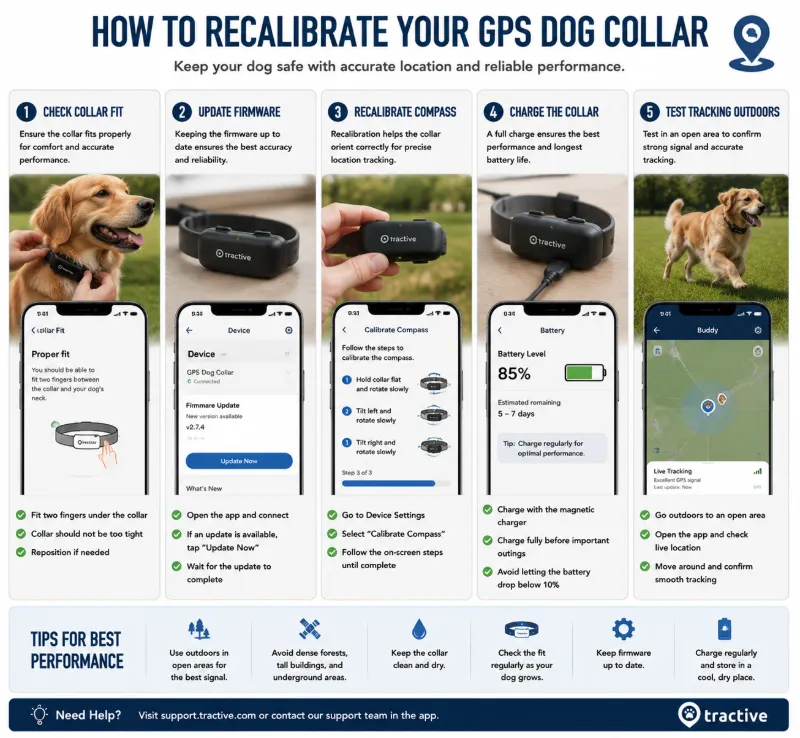
Many GPS collars include a digital compass or inertial sensors that help estimate direction and improve tracking performance. If calibration becomes inaccurate, the collar may display inconsistent movement or boundary behavior.
How to Recalibrate
Open the manufacturer's mobile app.
Navigate to the collar or device settings.
Locate the calibration option, if available.
Follow the on-screen instructions.
Perform the requested movements in an open outdoor area.
Allow the collar several minutes to reacquire satellite signals.
Different manufacturers use different calibration procedures. Always follow the instructions provided for your specific model.
Choose an Open Area
Calibration should be performed outdoors with a clear view of the sky. Performing calibration inside a building or near large metal objects may reduce accuracy.
Step 2: Remove Environmental Interference
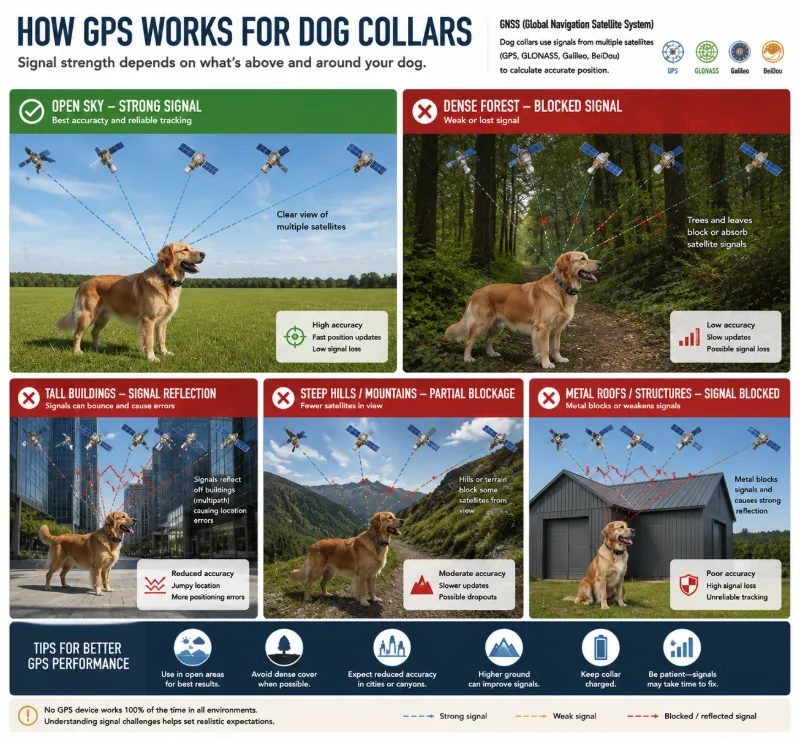
GPS signals are relatively weak by the time they reach the Earth's surface. Anything that blocks or reflects those signals can reduce positioning accuracy.
Dense Forest
Heavy tree cover can reduce the number of satellites visible to the collar. Thick foliage may also scatter or weaken satellite signals.
High Walls and Buildings
Urban environments can create "multipath" interference, where signals bounce off buildings before reaching the receiver. This may temporarily shift the reported location.
Metal Roofs and Structures
Large metal buildings, barns, shipping containers, and steel roofing may interfere with signal reception if the dog spends extended periods nearby.
Deep Valleys
Steep terrain can reduce the portion of the sky visible to the collar, limiting satellite reception.
Improving Reception
Test the collar in an open field.
Avoid calibrating near vehicles or metal fences.
Keep the base station, if used, in an unobstructed location.
Allow several minutes for satellite acquisition after startup.
Step 3: Check Firmware and App Updates
Software updates are one of the most commonly overlooked solutions for GPS problems.
Manufacturers frequently release firmware updates that improve:
Satellite acquisition speed
Battery management
Boundary stability
Tracking accuracy
Bluetooth communication
Mobile app compatibility
Update Checklist
Open the manufacturer's app.
Check for available firmware updates.
Update the mobile application.
Restart both the collar and your phone.
Reconnect the collar.
Test GPS outdoors.
Never interrupt a firmware update by removing power or moving the device out of communication range.
Step 4: Check Collar Fit and Contact Points
While GPS reception does not depend on skin contact, many smart collars combine GPS with activity sensors, wireless correction systems, or health-monitoring features that work best when the collar fits properly.
A collar that is too loose may:
Rotate around the neck
Move the GPS antenna into less favorable positions
Reduce contact-point effectiveness on training models
Create inconsistent sensor readings
Proper Fit
The collar should fit securely without restricting breathing or normal movement. Many manufacturers recommend that two fingers fit comfortably between the collar and the dog's neck, although specific guidance varies by brand and collar design.
Step 5: Check Battery Health
Low battery levels can affect GPS update frequency and wireless communication on some devices.
| Battery Condition | Possible Effect |
|---|---|
| Fully charged | Normal tracking performance |
| Moderately low | Reduced update frequency on some models |
| Nearly depleted | Possible signal interruptions or shutdown |
| Aging battery | Shorter runtime and more frequent charging |
If battery life has declined significantly after years of use, contact the manufacturer regarding replacement options where available.
Other Causes of Tracking Problems
| Symptom | Possible Cause | Suggested Check |
|---|---|---|
| Location freezes | Poor satellite reception | Move to open sky |
| Boundary alerts delayed | Weak GPS signal | Test in another location |
| Collar disconnects from app | Bluetooth or cellular issue | Reconnect device |
| Large location jumps | Temporary GPS drift | Observe after reacquiring satellites |
| Frequent offline status | Battery or communication issue | Charge and update firmware |
How Accurate Are GPS Dog Collars?
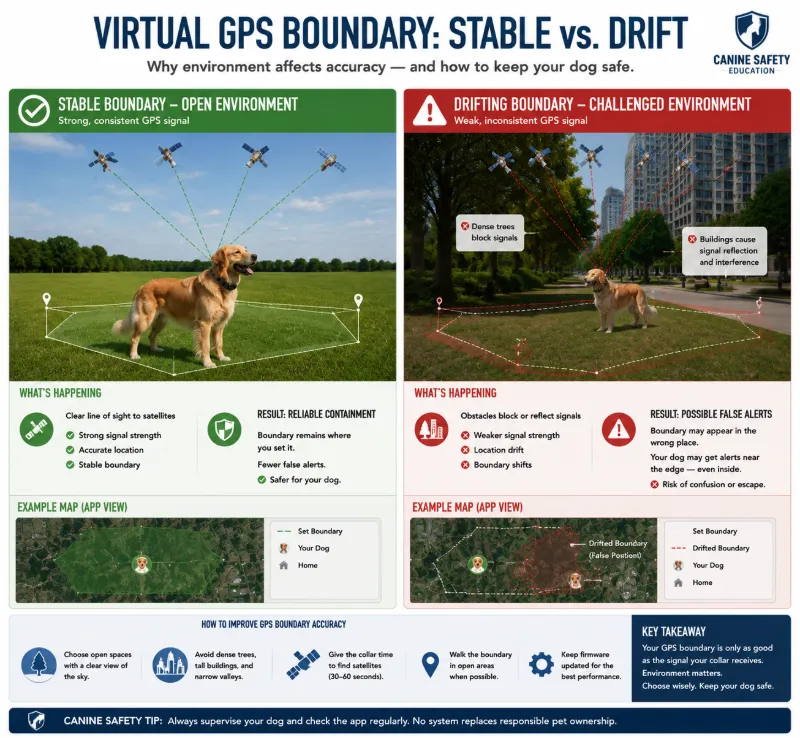
GPS accuracy depends on many variables, including satellite geometry, weather, terrain, vegetation, and the collar's receiver technology.
Manufacturers may advertise high accuracy under ideal conditions, but real-world performance can vary. Temporary deviations of several feet or more are possible, particularly in environments with heavy obstruction.
For this reason, virtual boundaries should generally include an appropriate safety buffer rather than being placed immediately beside roads, cliffs, lakes, or other hazards.
When to Upgrade or Switch Systems
If signal loss continues after troubleshooting, upgrading to a newer GPS collar with improved positioning technology may provide more reliable performance.
Garmin Alpha XL / Alpha Series
Best for: Hunting dogs, working dogs, and owners needing long-range tracking.
Garmin's premium tracking systems combine multi-GNSS satellite reception with advanced navigation features and are widely used by professional handlers. Depending on the model, they support GPS together with additional satellite constellations such as Galileo and GLONASS for improved positioning in challenging environments.
Key features may include:
Multi-GNSS satellite reception
Long-range tracking
Fast location updates
Rugged waterproof construction
Professional-grade navigation tools
Halo Collar 4
Best for: Virtual fencing and family pets.
The Halo Collar combines satellite positioning, cellular connectivity, and app-based virtual fencing. Newer generations have improved software, battery management, and positioning performance compared with earlier versions.
Features include:
Wireless virtual fences
GPS tracking
Activity monitoring
Remote app management
Automatic software updates
Always verify subscription requirements before purchasing, as some GPS collars require ongoing service plans for full functionality.
Features Worth Paying For
When comparing premium GPS collars, look beyond advertised range or battery life.
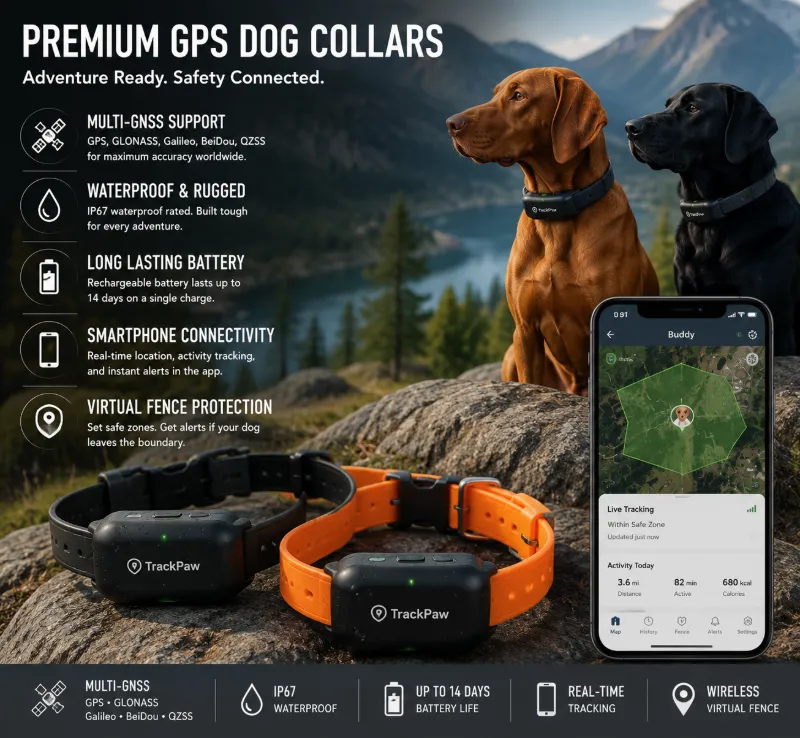
Support for multiple satellite constellations (such as GPS, Galileo, or GLONASS)
Fast satellite acquisition
Reliable firmware support
Frequent software updates
Good battery life
Waterproof construction
Accurate virtual boundary management
Responsive customer support
Some newer collars also advertise dual-frequency or enhanced GNSS technologies. Availability varies by model and manufacturer, and not every product on the market currently supports these features.
Preventing Future Signal Problems
Charge the collar before long outings.
Install firmware updates promptly.
Keep the GPS antenna unobstructed.
Inspect the collar regularly for damage.
Clean dirt from charging contacts.
Test boundary performance after updates.
Avoid relying solely on a virtual fence near major hazards.
Final Recommendation
Most GPS dog collar signal problems can be solved without replacing the device. Begin by recalibrating the collar, testing it in an open area, removing environmental interference, updating firmware, and confirming a secure fit.
If tracking remains unreliable despite proper troubleshooting, it may be time to upgrade to a newer system with improved multi-GNSS reception, stronger software support, and more advanced positioning technology. Regardless of the collar you choose, remember that GPS is a valuable aid—not a substitute for supervision, especially in areas with heavy traffic or other significant risks.
FAQs
Why does my GPS dog collar keep losing signal?
Signal loss is commonly caused by dense trees, tall buildings, steep terrain, low battery, outdated firmware, or temporary satellite reception issues.
Can trees block a GPS dog collar?
Yes. Thick forest canopy can reduce satellite visibility and temporarily decrease positioning accuracy.
Why does my virtual fence give false alerts?
Temporary GPS drift, poor satellite reception, or environmental interference can make the collar appear slightly outside its actual location. Proper calibration and an adequate safety buffer can help reduce false alerts.
Should I recalibrate my GPS collar?
If the manufacturer provides a calibration feature and tracking appears inaccurate, recalibration according to the official instructions may improve performance.
Does collar fit affect GPS accuracy?
The GPS receiver itself does not require skin contact, but a properly fitted collar helps keep the antenna correctly oriented and ensures other collar functions operate as intended.
How often should I update my GPS collar?
Check regularly for firmware and mobile app updates, as manufacturers frequently release improvements for tracking performance, stability, and compatibility.
Are dual-frequency GPS collars always more accurate?
Dual-frequency or advanced GNSS technologies can improve positioning under some conditions, but overall performance still depends on antenna design, software, satellite visibility, and the surrounding environment.
Can I rely entirely on a GPS virtual fence?
No. Virtual fences are useful training and management tools but should not be considered an infallible physical barrier, particularly near roads, cliffs, or other dangerous locations.