The Microchip Feeder Dilemma
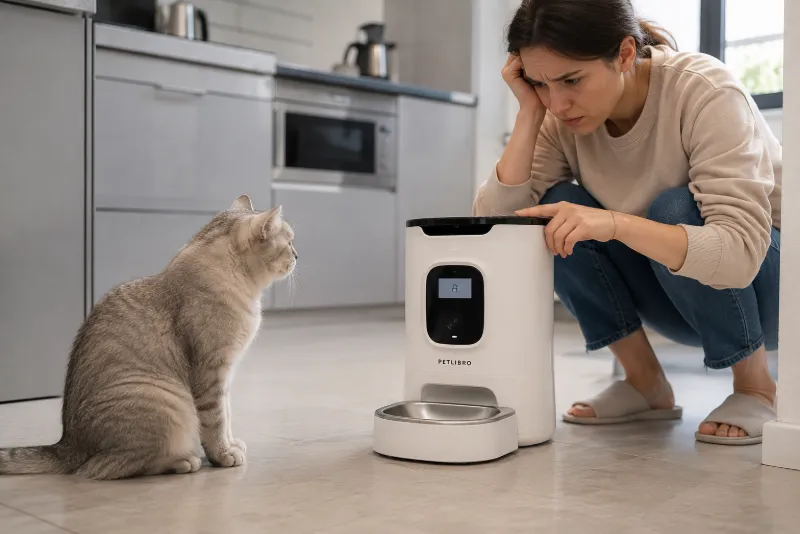
Microchip feeders are designed to identify an individual pet using either its implanted identification microchip or a compatible RFID collar tag. Once recognized, the lid opens only for the registered animal.
When recognition fails, several problems may occur:
One pet steals another's food.
Prescription diets are eaten by the wrong animal.
Timid pets become afraid to approach the feeder.
Food remains exposed and loses freshness.
Owners may mistakenly believe the implanted microchip has stopped working.
Fortunately, implanted identification microchips rarely fail completely. In many cases, the feeder simply needs maintenance or reconfiguration.
How Does a Microchip Feeder Work?
A microchip feeder contains an RFID reader positioned near the feeding opening. When your pet approaches, the reader searches for a compatible identification signal.
If the detected ID matches one stored in the feeder's memory, the lid opens automatically.
Most systems can also learn dedicated RFID collar tags for pets whose implanted microchips are incompatible or difficult to detect.
Step 1: Re-Learn Your Pet's Microchip
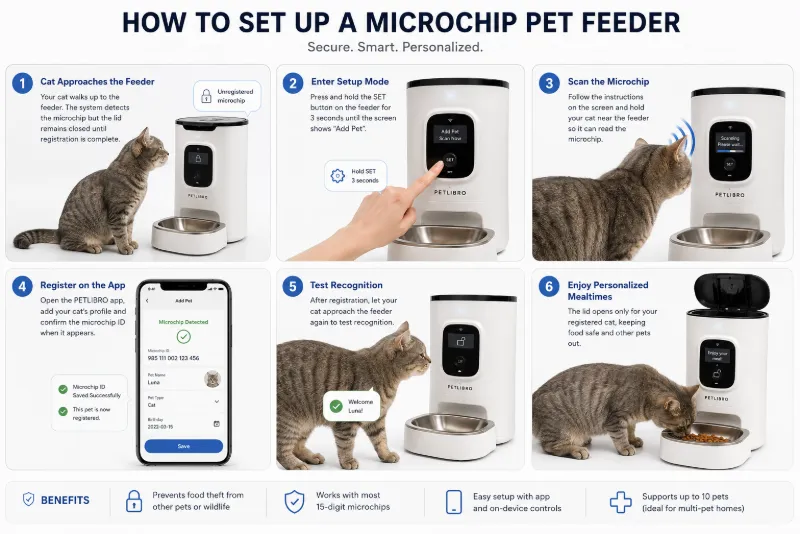
One of the most common reasons a feeder stops opening is that the stored identification was accidentally erased or was never programmed correctly after battery replacement or factory reset.
Signs This May Be the Problem
The feeder never opens.
The pet is ignored every time.
The feeder responds normally to buttons but not to the pet.
The problem began after replacing batteries.
How to Reprogram
Open the feeder's learning or pairing mode.
Follow the manufacturer's instructions for your specific model.
Allow your pet to approach naturally.
Wait until the feeder confirms successful registration.
Test several feeding attempts.
Many newer feeders also allow chip management through a companion mobile app, while others perform programming directly on the device.
If your pet has both an implanted microchip and an RFID collar tag, verify that the feeder is learning the correct identifier.
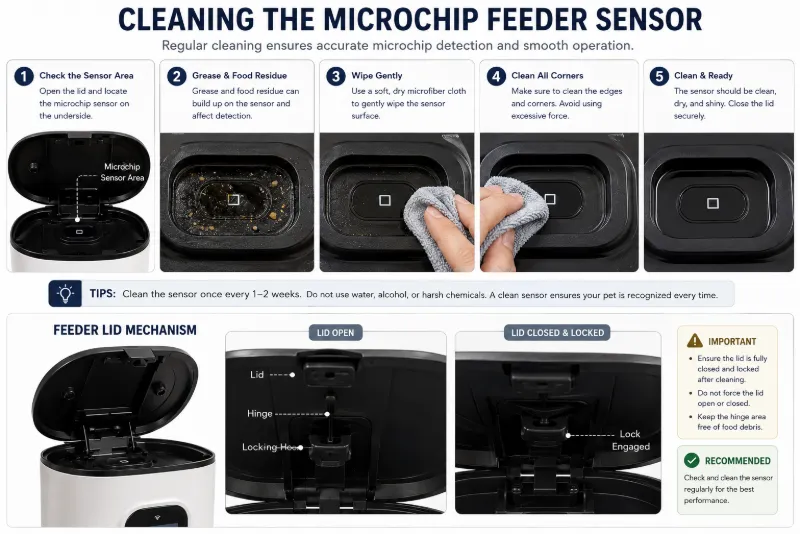
Step 2: Clean the Sensor Lens
The RFID reader itself is usually sealed inside the feeder, but many models also use infrared or proximity sensors to detect when a pet approaches.
Over time these areas may become contaminated by:
Food grease
Wet food residue
Dust
Cat hair
Condensation
Water splashes
Dirty sensors may delay lid movement or prevent reliable detection.
Cleaning Procedure
Turn off the feeder.
Remove food bowls if necessary.
Use a soft microfiber cloth.
Lightly dampen with clean water if recommended.
Remove grease and food residue.
Dry completely before restarting.
Avoid abrasive cleaners, solvents, or sharp tools that may scratch sensor windows.
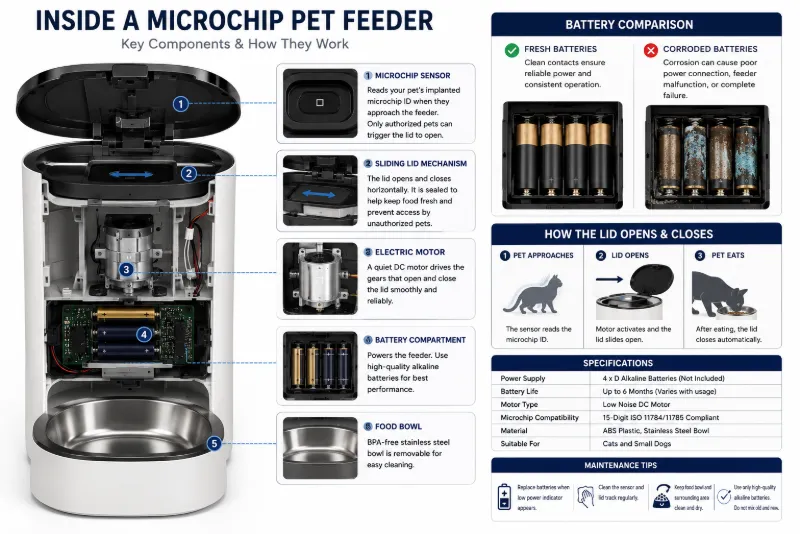
Step 3: Check the Batteries
Battery problems are frequently overlooked because many feeders continue powering the display even when the motor no longer receives sufficient power.
As battery voltage drops, the feeder may:
Open slowly.
Stop halfway.
Click repeatedly.
Fail to recognize the pet consistently.
Close unexpectedly.
Replace Batteries Before They Are Fully Depleted
Some feeders do not display a low-battery warning until performance has already begun to decline.
Whenever recognition becomes unreliable, replacing the batteries with fresh, high-quality cells is a simple troubleshooting step.
Inspect Battery Contacts
Also check for:
Corrosion
Loose contacts
Moisture
Incorrect battery orientation
Step 4: Check Intruder Mode Settings
Many premium feeders include an anti-intruder or "Intruder Mode" designed to prevent another pet from stealing food while the registered pet is eating.
If enabled incorrectly, this feature may appear as though the feeder has stopped working.
Depending on the manufacturer, the feeder may:
Close immediately when another pet approaches.
Delay reopening.
Require the registered pet to remain in a specific position.
Ignore unexpected movement.
Review the current feeder settings and verify that anti-intruder functions match your household's needs.
Step 5: Confirm Proper Microchip Position
Implanted identification microchips are typically placed beneath the skin between the shoulder blades. Individual anatomy, body position, and feeder design can influence how easily the chip is detected.
If your pet approaches from an unusual angle or lowers its head differently than expected, recognition may occasionally take longer.
Encourage your pet to approach naturally without forcing its head into position.
Other Reasons a Microchip Feeder May Not Open
| Problem | Possible Cause | Suggested Check |
|---|---|---|
| Lid moves slowly | Weak batteries | Replace batteries |
| No movement | Motor obstruction | Inspect lid tracks |
| Random opening | Incorrect registered ID | Reprogram feeder |
| Intermittent recognition | Dirty sensor or poor approach angle | Clean and retest |
| Lid sticks | Dried food residue | Clean moving components |
Keep the Lid Tracks Clean
Dry kibble fragments, wet food residue, and pet hair may accumulate in the sliding mechanism.
Regularly inspect:
Sliding rails
Hinges
Rubber seals
Moving covers
Keeping these areas clean helps reduce motor strain and improves opening reliability.
Can Multiple Pets Confuse the Feeder?
Modern microchip feeders are designed to distinguish between different registered pets.
However, recognition may become more difficult if several animals crowd around the feeder simultaneously.
For best results:
Provide enough feeding space.
Reduce competition.
Allow each pet to approach individually.
Routine Maintenance
| Maintenance Task | Suggested Frequency |
|---|---|
| Clean sensor area | Weekly |
| Remove food residue | Several times each week |
| Inspect lid movement | Monthly |
| Replace batteries | As recommended or when performance declines |
| Verify registered pet IDs | After resets or battery replacement |
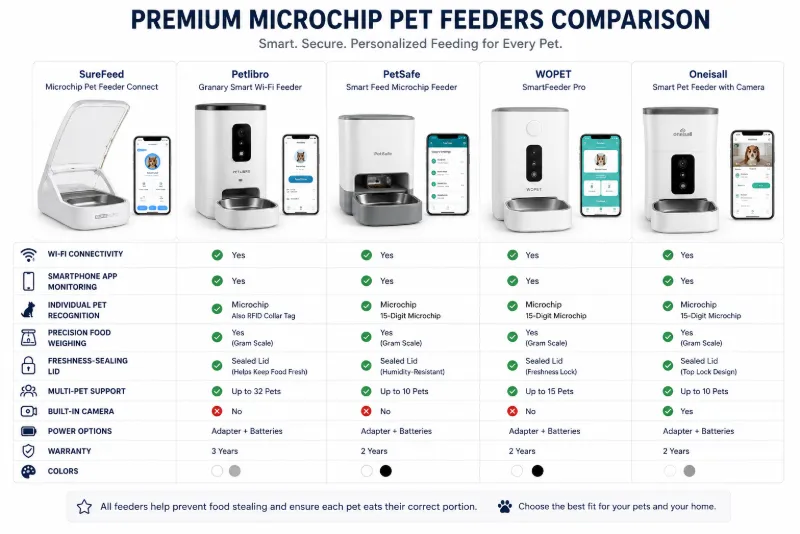
When Should You Upgrade?
If your feeder repeatedly fails despite cleaning and maintenance, upgrading to a newer model may improve both reliability and convenience.
Modern premium feeders often include:
Wi-Fi connectivity
Smartphone notifications
Remote feeding history
Built-in food weighing
Automatic portion tracking
Improved pet recognition
Multiple authorized pet profiles
Recommended Premium Smart Feeders
1. SureFeed Connect Microchip Pet Feeder
Best for: Multi-cat households and prescription diets.
Key features include:
Microchip recognition
Companion app (with compatible hub)
Feeding history
Freshness-sealing lid
Individual pet access
2. PETLIBRO Polar Wet Food Feeder
Best for: Owners who need smart monitoring and refrigerated wet food storage.
Depending on the model, features may include:
Wi-Fi connectivity
App control
Cooling technology
Feeding records
Remote notifications
3. Sure Petcare SureFeed Microchip Pet Feeder Connect
Best for: Owners seeking advanced monitoring together with individual pet identification.
Premium models may provide:
Remote monitoring
Multiple pet management
Detailed feeding reports
Improved food freshness
Integration with compatible smart pet ecosystems
Before purchasing, verify whether Wi-Fi functionality requires an additional hub or subscription, as features vary by manufacturer and region.
Choosing the Right Microchip Feeder
Beyond reliable recognition, consider these features:
Fast lid response
Quiet motor
Easy-to-clean bowls
Freshness seal
Battery life
Remote monitoring
Food weight tracking
Reliable customer support
Final Thoughts
Most microchip feeder problems are surprisingly simple to solve. Re-learning your pet's microchip, cleaning the sensor area, replacing aging batteries, checking anti-intruder settings, and keeping the lid mechanism clean often restore normal operation.
If recognition problems continue after troubleshooting, upgrading to a modern smart feeder with Wi-Fi monitoring, improved RFID detection, and food-weighing capabilities may provide greater convenience and peace of mind—especially in households with multiple pets or animals requiring specialized diets.
FAQs
Why is my microchip feeder not opening?
The most common causes include an unregistered microchip, dirty sensors, weak batteries, blocked lid tracks, or incorrect feeder settings.
Can a pet's implanted microchip stop working?
Implanted identification microchips rarely fail completely. Recognition issues are more often related to feeder settings, positioning, or maintenance.
Why does the feeder open slowly?
Slow lid movement is commonly associated with weak batteries, food debris in the mechanism, or increased motor resistance.
Do I need to reprogram the feeder after changing batteries?
Some models retain stored information, while others may require pets to be registered again after a reset. Check the manufacturer's instructions for your feeder.
How often should I clean the sensor?
Cleaning the sensor area weekly and removing food residue several times per week helps maintain reliable performance.
What is Intruder Mode?
Intruder Mode is a feature on some feeders that helps prevent unauthorized pets from stealing food by closing the lid or limiting access when another animal approaches.
Are Wi-Fi feeders worth upgrading to?
For households with multiple pets or animals on prescription diets, Wi-Fi-enabled feeders with feeding history, remote alerts, and food-weight tracking can provide additional convenience and monitoring.
Can microchip feeders help overweight pets?
Yes. Individual recognition prevents food stealing and helps ensure each pet receives only its intended meals, which may support veterinary weight-management plans.