The Annoyance of Constant Beeping
A solar mole repeller should operate quietly and consistently according to its design. Some models intentionally emit short audible beeps during activation or testing, while others work almost silently and generate underground vibration with little or no audible sound.
If your unit begins beeping continuously or much more frequently than described in the manufacturer's instructions, it may indicate a maintenance issue or fault.
Constant beeping can become frustrating because it may:
Disturb people relaxing outdoors.
Wake nearby residents during quiet evenings.
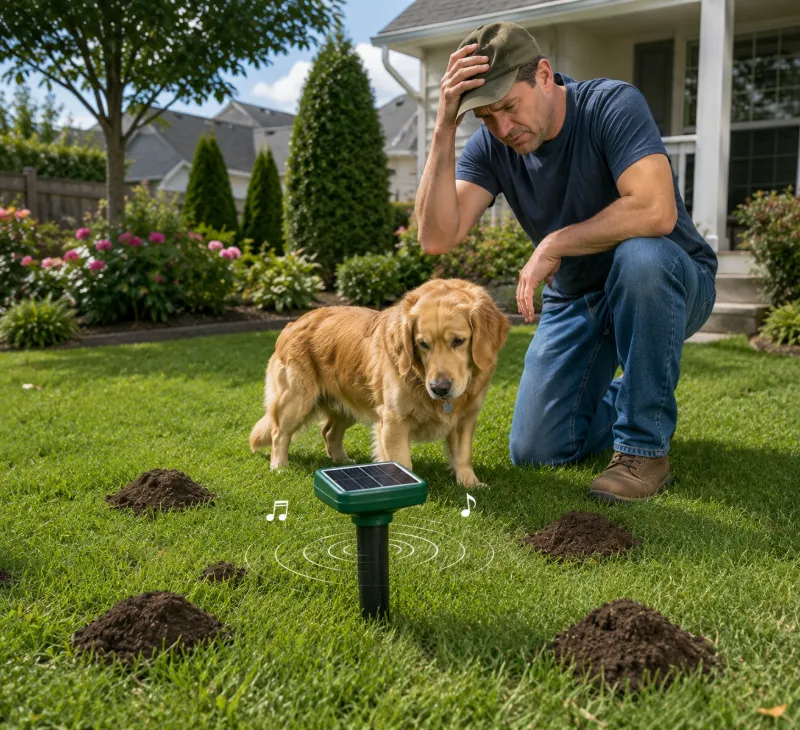
Attract the attention of curious dogs.
Cause some sensitive pets to avoid parts of the yard.
Suggest the device is not operating efficiently.
Before replacing the unit, work through the following troubleshooting steps.
How Solar Mole Repellers Work
Most solar mole repellers include four basic components:
A small solar panel
A rechargeable battery
An electronic controller
A vibration or sound-producing mechanism
During daylight, the solar panel charges the internal battery. The stored energy powers periodic vibration or sound pulses that travel through the soil. These repeated disturbances are intended to encourage moles, voles, gophers, and similar burrowing animals to move elsewhere.
Because designs vary, always refer to your manufacturer's documentation for normal operating sounds and flashing-light patterns.
Quick Fix #1: Clean the Solar Panel
The most common cause of repeated low-power alarms is insufficient battery charging.
Even a high-quality solar panel cannot recharge efficiently when it is covered by:
Bird droppings
Mud
Dust
Grass clippings
Tree sap
Leaves
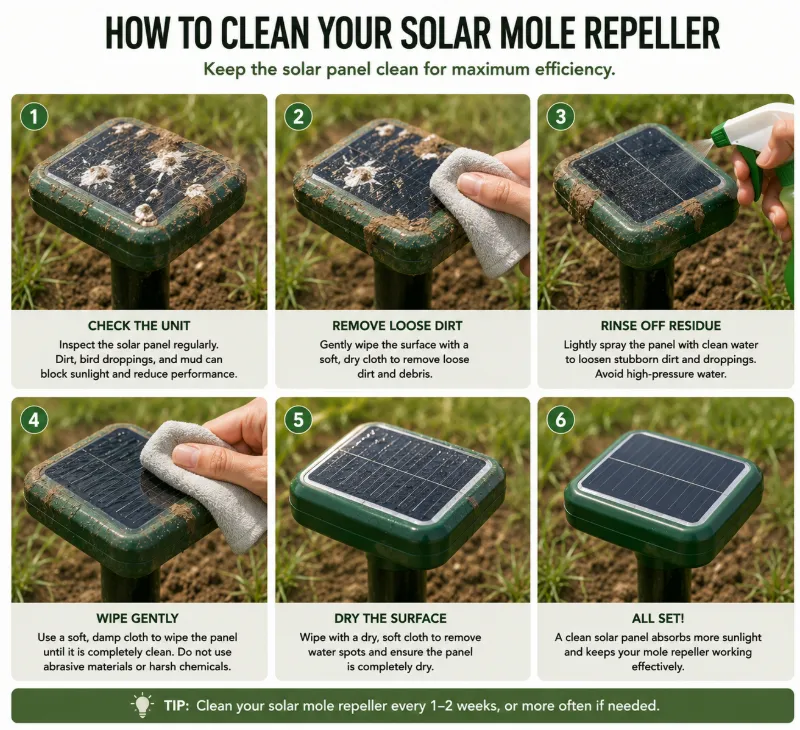
How to Clean the Solar Panel
Turn off the device if the manufacturer recommends doing so.
Wipe the solar panel with a soft damp cloth.
Remove stubborn dirt using clean water.
Avoid abrasive cleaners or rough brushes.
Allow the panel to dry before returning it to full sunlight.
Cleaning the panel regularly helps maximize charging efficiency throughout the year.
Quick Fix #2: Check for Battery Corrosion
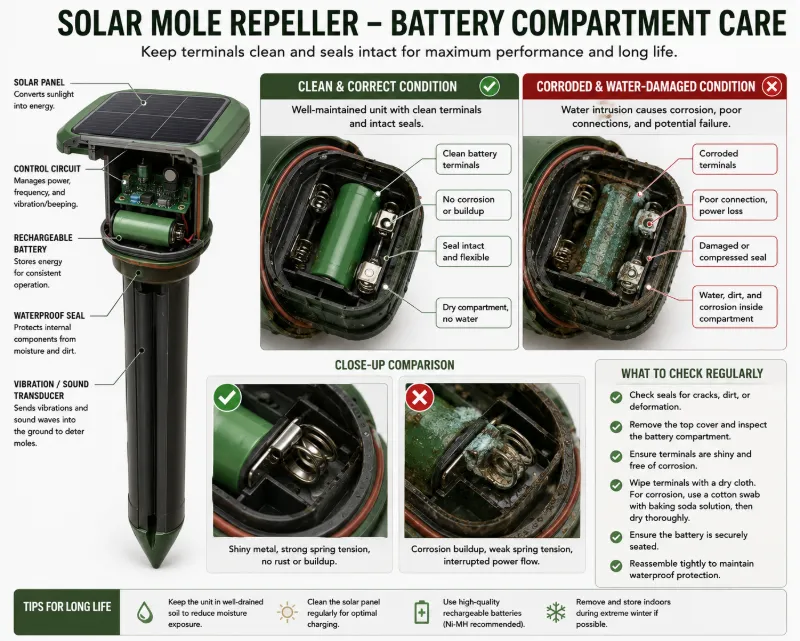
If the device has experienced heavy rain, irrigation, or freezing conditions, inspect the battery compartment for signs of moisture damage.
Water entering the housing may lead to:
Battery corrosion
Poor electrical contact
Intermittent power
Repeated warning beeps
Signs of Corrosion
White or green deposits on battery terminals
Rust on metal contacts
Water droplets inside the compartment
Damaged sealing gasket
What to Do
If corrosion is present, discontinue use until the compartment is cleaned and fully dried. Replace damaged rechargeable batteries with the type recommended by the manufacturer, and replace worn seals if spare parts are available.
Quick Fix #3: Consider Soil Moisture Conditions
Soil conditions can influence how vibration travels and how some repellers perform.
After prolonged rain, the soil may become heavily saturated. Extremely wet ground can alter vibration transmission and, on some designs, affect the operation of vibration-producing components or related electronics.
Although the exact effect depends on the device design, unusual behavior after heavy rainfall may improve once the soil drains and the unit dries.
If Heavy Rain Has Recently Occurred
Inspect the housing for water intrusion.
Ensure the cap is fully tightened.
Allow the unit to dry in sunny weather.
Monitor whether normal operation returns after the soil dries.
Other Common Causes of Continuous Beeping
| Problem | Possible Cause | Suggested Solution |
|---|---|---|
| Beeping only at night | Battery not charging fully | Improve solar exposure |
| Random beeping | Loose battery connection | Inspect battery contacts |
| No vibration | Low battery or failed motor | Recharge and inspect |
| Works only occasionally | Shaded installation | Move to full sunlight |
| Stops after rain | Moisture inside housing | Dry and inspect seals |
Choose the Right Installation Location
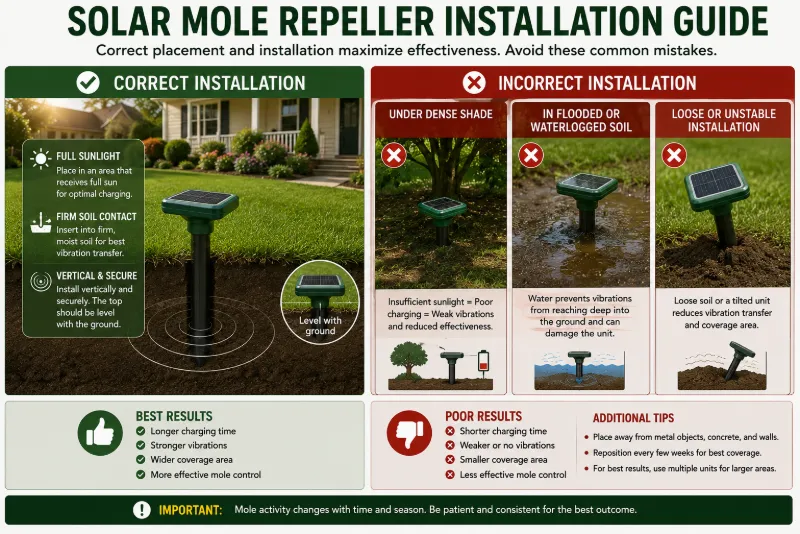
Correct placement affects both charging performance and vibration coverage.
Place the Unit in Full Sun
Solar panels should receive several hours of direct sunlight each day whenever possible. Dense shade beneath trees, fences, or buildings can significantly reduce charging efficiency.
Insert the Spike Firmly
The ground stake should make good contact with the soil. Loose installation may reduce the transmission of vibration into the surrounding ground.
Avoid Hard Surfaces
Do not install the device directly through concrete, paving stones, or compacted gravel where vibration cannot spread effectively.
Maintain Appropriate Spacing
Large lawns often require multiple repellers. Consult the manufacturer's recommended coverage area instead of placing every unit in one corner of the yard.
Do Pets Hear Solar Mole Repellers?
Some mole repellers produce low-frequency vibrations, while others emit audible or ultrasonic sounds depending on the design.
Dogs and some other animals can hear a wider range of frequencies than humans. As a result, certain pets may notice sounds that people barely detect.
If a dog repeatedly avoids the device, appears anxious, or investigates it excessively, consider relocating the unit to another part of the property while maintaining effective pest coverage.
Seasonal Performance
| Season | Possible Effect |
|---|---|
| Summer | Maximum solar charging |
| Autumn | Leaves may block sunlight |
| Winter | Shorter daylight and lower charging efficiency |
| Spring | Wet soil may temporarily affect operation |
How Often Should You Maintain a Solar Mole Repeller?
Clean the solar panel every few weeks or after storms.
Inspect the housing after heavy rain.
Check battery terminals periodically.
Remove accumulated leaves or grass.
Ensure the unit remains upright and secure.
When Is It Time to Replace the Repeller?
Replacement may be appropriate if:
The battery no longer holds a charge.
The housing has cracked.
Water repeatedly enters the electronics.
The vibration mechanism has failed.
Continuous beeping persists after maintenance.
Recommended Features When Buying a New Solar Mole Repeller
Rather than choosing solely on advertised coverage distance, look for features that improve durability and reliability.
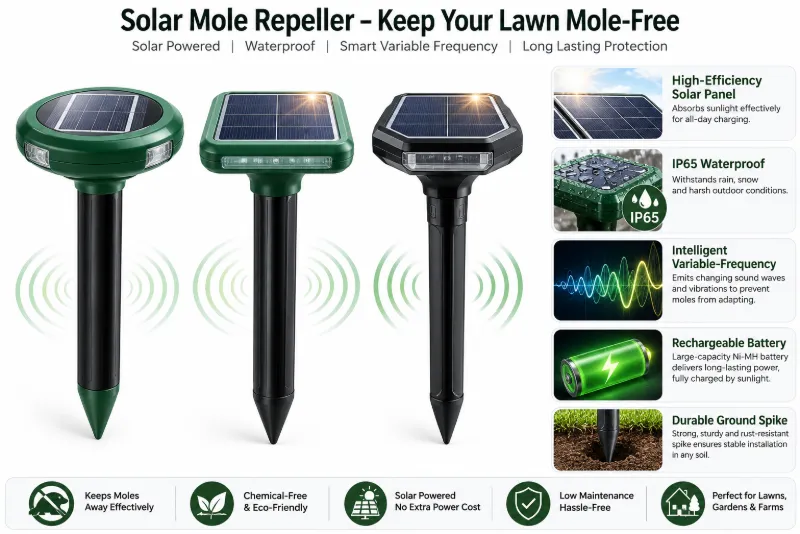
1. IP65 or Higher Water Resistance
An IP65-rated housing helps protect the electronics against rain and dust. Higher ratings may provide additional protection depending on the manufacturer and design.
2. Intelligent Variable-Frequency Operation
Some premium models automatically vary pulse timing or vibration frequency. This feature is intended to reduce the chance that burrowing animals become accustomed to a repetitive pattern.
3. High-Efficiency Solar Charging
A larger, high-quality solar panel and efficient charging circuit may improve operation during periods of reduced sunlight.
Popular Premium Solar Mole Repellers
1. Aspectek Solar Mole Repeller
Best for: Homeowners seeking weather-resistant construction and broad yard coverage.
Common features include:
Solar charging
Weather-resistant housing
Low-maintenance operation
Suitable for lawns and gardens
2. Victor Solar Sonic Spike
Best for: Established lawns and gardens.
Typical features include:
Solar-powered operation
Ground vibration technology
Outdoor weather resistance
Simple installation
3. Hoont Solar Mole Repeller
Best for: Larger properties requiring multiple units.
Common features include:
Solar-powered battery charging
Outdoor waterproof construction
Periodic vibration pulses
Multiple-unit deployment
Product features may change over time, so verify current specifications—including waterproof ratings, operating modes, and warranty coverage—before purchasing.
Preventing Future Problems
Install in full sunlight.
Keep the solar panel clean.
Avoid areas that flood regularly.
Inspect battery seals every season.
Replace aging rechargeable batteries when recommended.
Follow the manufacturer's maintenance schedule.
Final Recommendation
Continuous beeping from a solar mole repeller is often related to charging problems, battery issues, moisture, or environmental conditions rather than complete device failure. Begin with the simplest solutions by cleaning the solar panel, inspecting the battery compartment, and checking for water intrusion after rain.
If the unit continues malfunctioning despite proper maintenance, upgrading to a weather-resistant model with IP65 protection, efficient solar charging, and intelligent variable-frequency operation may provide more dependable long-term performance. Choosing the correct installation location is just as important as selecting the device itself, since even the best repeller cannot operate effectively without sufficient sunlight and stable ground conditions.
FAQs
Why does my solar mole repeller keep beeping?
Continuous beeping often indicates a charging problem, low battery, moisture intrusion, or another fault. Check the manufacturer's manual for your model's specific alarm meanings.
Can a dirty solar panel cause constant beeping?
Yes. Dirt, bird droppings, leaves, or mud can reduce charging efficiency, potentially leading to low-battery warnings on some models.
Does rain affect solar mole repellers?
Rain itself should not affect a properly sealed device, but water entering a damaged housing or unusually saturated soil may contribute to operational problems on some units.
Do solar mole repellers bother dogs?
Some dogs may notice certain sounds or vibrations depending on the design of the repeller and the individual dog's hearing sensitivity. If your dog appears distressed, consider relocating the unit.
How often should I clean the solar panel?
Inspect the panel regularly and clean it whenever dirt, dust, leaves, or bird droppings begin reducing sunlight exposure.
What waterproof rating should I look for?
Many outdoor devices use an IP65-rated housing or higher for improved protection against rain and dust. Always confirm the rating provided by the manufacturer.
Why doesn't my repeller work after cloudy weather?
Several consecutive cloudy days may reduce battery charging, especially on older units or in winter. Once sunlight returns, allow the battery time to recharge fully.
Should I replace or repair my solar mole repeller?
If cleaning, drying, and battery inspection do not resolve repeated faults—or if the housing or electronics are damaged—replacement is often the more reliable long-term solution.